


Veho Driver
4.61.96K Reviews
App Specs
- Version
- 3.4.4
- Updated On
- License
- Free
- Downloads
- 500,000+
- Developer
- Veho
- Categories
- Business
- Platform
- Android
Screenshots

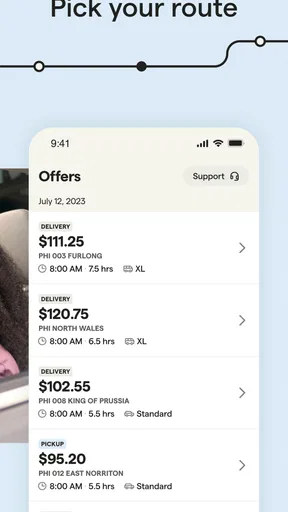
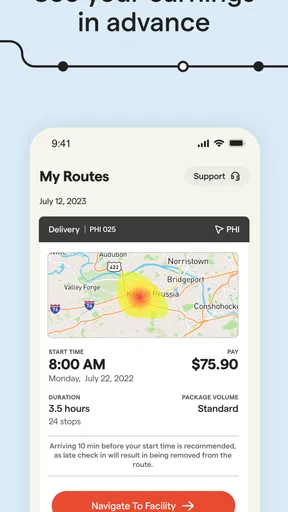
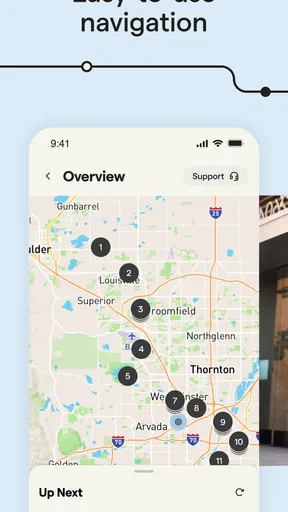

 Analysis by AppCompare
For a delivery driver, a phone is more than a map: it is the link between a route, its changing details, and the next decision on the road. That makes connectivity a practical part of the experience with Veho Driver, Veho’s free business app for drivers. It is intended for people who want to choose routes, areas, and trip lengths, so it may suit someone fitting deliveries around other commitments better than an app built around a fixed schedule.
When a reliable connection matters
Delivery work involves checking information while moving between stops, not just looking at a route before leaving home. Notifications, directions, and delivery details are most useful when they arrive in time to act on them. I would treat a dependable mobile connection as part of preparation: check that the phone is connected before setting out, and avoid relying on a last-minute update while already trying to find a safe place to stop.
A useful habit is to review the route and any available delivery information while parked, then use the phone for the next decision rather than repeatedly handling it on the move. That is not just a matter of convenience. It keeps attention on driving and gives you a moment to notice if the connection or navigation is behaving unexpectedly.
Designed for shifts that move around
The app’s emphasis on choosing an area and trip length is relevant to drivers with uneven availability. Someone with a free morning between other responsibilities may value a shorter commitment, while a person planning a longer workday may prefer to consider a broader stretch of driving. The useful question is not simply whether flexible work sounds appealing, but whether the available routes fit the time, travel, and energy you can actually set aside.
For example, imagine finishing a morning commitment and having a block of time before the afternoon. You could check what route options make sense, consider how far you are willing to travel to begin, and decide whether the trip is a realistic fit rather than accepting work just because the app is open. This kind of planning helps keep flexibility from turning into an unpredictable day.
That choice also has a trade-off: selecting a route does not make traffic, parking, or the time needed at each stop predictable. I would leave room for those practical complications rather than judging a trip only by its apparent length. A route that fits neatly on a screen may feel different when you account for the time it takes to reach the area and complete the work.
What to do when the phone experience falters
Navigation and delivery apps are only reassuring when the phone is behaving well. If directions appear delayed or an update does not seem to arrive, the safest response is to pull over somewhere appropriate before checking the screen. Confirm the connection and the app’s current information, then decide whether it is sensible to continue. Trying to troubleshoot while driving adds risk without making the route clearer.
Worth Reading Before You Choose

EA SPORTS FC Mobile 26 Is a Bigger Football Game, but It Takes Time

Flipboard Shows What News Apps Must Do Beyond the Feed

Switching to Android Auto Means Rethinking Your Driving Routine

Google Calendar Makes a Crowded Week Easier to Manage

Ludo King Makes the Most of the Minutes Between Plans

Baby Panda World Brings Quick Play to Modern Phones, but Its Game Library Feels Busy
It is also worth treating the phone itself as work equipment. Before a shift, make sure it has enough battery for the time you expect to be out, and consider whether your usual mount and charging setup are dependable. These are simple checks, but a dim or nearly empty phone is a poor companion when you need directions and timely delivery information.
Keep the trip practical, not just digital
Drivers who are mindful of mobile data can make deliberate choices without assuming that every screen behaves the same way. Check route and delivery information when connected, keep navigation use purposeful, and avoid spending a shift repeatedly refreshing pages without a clear reason. If your mobile plan is limited, it is sensible to understand how your ordinary navigation and work apps use data before taking on a long day.
There is a broader distinction between this kind of driver app and general map apps. A map can help with navigation, but it does not by itself provide a work context for choosing Veho routes and areas. Conversely, a driver-focused tool is not a substitute for your own judgment about traffic, parking, or whether a trip suits your day. I would use the app to organize the delivery work and keep personal navigation habits and road awareness in the picture.
Your Roadmap to Veho Driver
Right off the bat, downloading and setting up Veho Driver was a breeze. Available on both Android and iOS, you can grab it from the Google Play Store or Apple’s App Store. Once installed, the app guides you through a straightforward registration process. It’s as easy as pie—just enter your details, upload the necessary documents, and you’re on your way.
Features that Keep You in the Driver’s Seat
What makes Veho Driver stand out is its user-friendly interface. The app boasts a clean, intuitive design that makes navigation a piece of cake. Whether you’re tech-savvy or just a regular Joe, you’ll find it easy to get the hang of it.
One of the first things I noticed was the real-time route optimization feature. This nifty tool helps you find the quickest and most efficient routes, saving both time and fuel. Plus, the app provides detailed directions, so you’ll never feel lost on the road.
Another standout feature is the earnings tracker. You can keep tabs on your earnings with ease, which is crucial for anyone looking to maximize their income. The app updates your earnings as soon as you complete a delivery, so there’s no guessing involved.
What’s in It for You?
Now, let’s talk about the perks of using Veho Driver. The app offers flexible hours, allowing you to work whenever it suits you. Whether you're a night owl or an early bird, you can choose your schedule. This flexibility is perfect for students, part-timers, or anyone looking to earn some extra cash.
Moreover, the app connects you with a robust support system. If you ever encounter any issues on the road, the support team is just a tap away. They’re quick to respond and always ready to help, ensuring that your driving experience remains smooth.
Hitting the Road – My Experience
After using the app for a few weeks, I can say it’s been a rewarding experience. The real-time notifications keep you updated on incoming deliveries, and the detailed customer profiles help you know exactly what to expect. I found the map integration seamless, and it synced perfectly with my phone’s GPS.
What’s more, Veho Driver offers a rating system that encourages high-quality service. Drivers are motivated to maintain a good rating, and in return, they get access to better delivery opportunities. This mutual benefit ensures that both drivers and customers have a positive experience.
Who I’d recommend it to—and who should think twice
I’d point a driver who wants to explore delivery work on a flexible basis toward Veho Driver, especially if choosing an area and trip length matters more than having one fixed routine. It may also be worth considering for someone who already knows the neighborhoods they are comfortable driving in and can plan around a particular block of free time.
I would not treat it as a guaranteed fit for every driver, though. If you need a predictable daily schedule, want work that does not depend on driving and a smartphone, or cannot spare time for travel and delivery stops, a different kind of job may suit you better. The app can help organize a Veho driving opportunity; it cannot make an unsuitable route, time window, or working day practical.
There is also a difference between flexibility and certainty. Being able to choose among routes and trip lengths gives you a say in how work fits your life, but it does not tell you what your total take-home income will be after costs. I’d keep a basic record of time spent, distance driven, and vehicle expenses outside the app if you are deciding whether this is worthwhile as regular work. That makes it easier to judge the actual value of a shift instead of focusing only on the earnings figure shown for deliveries.
Before you commit to a route
A small planning routine can make the app more useful. Before accepting or beginning a trip, check the route area against your starting point and the rest of your day. Think about whether you can reach the area comfortably, whether you have enough time for the full commitment, and whether your phone is ready for navigation. These checks help answer a practical question the app alone cannot: does this opportunity fit the day you really have?
For a first outing, I’d avoid stacking a delivery shift against an appointment that cannot move. Leave a cushion for traffic, finding a place to stop, and any time needed to handle a delivery. Once you have a better feel for how a route works in your own circumstances, you can make more confident choices about trip length. This is a more useful way to test the arrangement than assuming that a short-looking route will necessarily be a short day.
Drivers comparing options should also distinguish a driver platform from a general navigation app or a conventional job board. A map is useful for getting around, but it does not provide the same work-specific setting for selecting Veho routes and areas. A job board may offer more conventional roles and schedules, which could be preferable if stability matters more than choosing individual trips. Veho Driver’s appeal is the chance to organize delivery work around selected driving opportunities, not a promise that it will replace every other income source.
How I’d judge the app before making it a routine
Veho Driver is free, is rated for Everyone, and has an average rating of 4.6 from around 12,000 ratings. It has been installed over 500,000 times, and its current version is 3.3.3. Those figures suggest that many people have tried it, but they do not tell me whether a particular route or work pattern will suit an individual driver. I’d use them as background, then focus on the app’s fit with my area, schedule, and phone setup.
The developer is Veho, and the app sits in the business category rather than functioning as a general-purpose driving utility. That distinction matters: its value depends on wanting to take part in Veho delivery work. If you only need directions for personal trips, a standard map app is the simpler choice. If you are exploring delivery work but need to compare several providers, look at each one’s route choices and working arrangements rather than assuming the apps offer interchangeable opportunities.
One question a new driver may have is whether the app is useful before deciding to work regularly. I think it can be a way to examine the route-selection approach and see whether this kind of delivery work fits your routine, while keeping expectations grounded. Another is whether the phone needs to stay connected during a shift: because the experience relies on current directions and delivery updates, I would plan for mobile connectivity instead of assuming that a route can be managed without it.
If something goes wrong, the practical first step is not to keep tapping while driving. Stop safely, check whether the phone has a connection and whether the information on screen is current, then use the available support if the issue remains. A driver should also have a sensible plan for reaching a safe stopping place and keeping the phone powered. These habits do not remove every interruption, but they make a disruption easier to handle without letting it become a road-safety problem.
Wrapping It Up
All in all, Veho Driver is a solid choice for anyone looking to dive into the world of delivery driving. With its user-friendly design, real-time tracking, and excellent support, it’s a top contender in the driving app arena. Whether you’re looking for a side gig or a full-time venture, this app offers the flexibility and resources to help you succeed.
So, if you’re ready to hit the road and start earning, why not give Veho Driver a spin? It could be your ticket to a new and exciting opportunity.
My connectivity verdict
I’d consider connectivity a working requirement for getting the most from Veho Driver, not a minor technical detail. Current directions and delivery information matter in the moment, so I’d prepare the phone before leaving and make a safe stop if the screen or updates become confusing. Drivers who can build that habit into their routine are better placed to benefit from the app’s route choices; anyone needing a dependable offline workflow should look for an option that explicitly supports that need.
My overall recommendation is for drivers who value choosing their delivery area and trip length, can stay attentive to changing road conditions, and are comfortable planning around a connected phone. If those conditions fit your day, this business app is worth considering. If they do not, a more predictable job arrangement or a navigation tool for personal driving will be a better match.
Pros
- User-friendly interface makes navigation easy.
- Real-time route updates improve efficiency.
- Flexible scheduling options for drivers.
- Supports multiple payment methods.
- Comprehensive earning analytics provided.
Cons
- Occasional glitches in app performance.
- Limited customer support response time.
- High data usage in tracking mode.
- Requires constant GPS access
- draining battery.
- Some features locked behind paywall.
FAQs for Veho Driver
What is Veho Driver and how does it work?
Veho Driver is a mobile application designed for drivers to efficiently manage and fulfill delivery tasks. It provides real-time navigation, route optimization, and direct communication with dispatch. Users can easily accept delivery assignments, track their deliveries, and update their status, making the process seamless and efficient.
Is Veho Driver available for both Android and iOS devices?
Yes, Veho Driver is available for download on both Android and iOS platforms. Users can find the app on the Google Play Store for Android devices and the Apple App Store for iOS devices, ensuring broad accessibility for all drivers regardless of their smartphone preference.
What are the system requirements to use Veho Driver?
To use Veho Driver, your device must have at least Android 6.0 or iOS 11.0 installed. Additionally, an active internet connection is required for real-time updates and navigation. Ensuring your device meets these specifications will guarantee optimal performance and a smooth user experience.
Does Veho Driver support multiple languages?
Currently, Veho Driver primarily supports English, which is used for all in-app instructions and communications. However, there are plans to include additional languages in future updates to cater to a wider range of users and enhance usability for non-English speaking drivers.
Are there any costs associated with using Veho Driver?
Downloading and using Veho Driver is free for drivers. However, users should be aware of potential data charges from their mobile service providers when using the app's features, such as navigation and real-time updates, which require an internet connection.


